HackTheBox Sherlock: RogueOne

Sherlock Scenario
Your SIEM system generated multiple alerts in less than a minute, indicating potential C2 communication from Simon Stark’s workstation. Despite Simon not noticing anything unusual, the IT team had him share screenshots of his task manager to check for any unusual processes. No suspicious processes were found, yet alerts about C2 communications persisted. The SOC manager then directed the immediate containment of the workstation and a memory dump for analysis. As a memory forensics expert, you are tasked with assisting the SOC team at Forela to investigate and resolve this urgent incident.
Artefacs Provided
The following evidence was provided for analysis:
RogueOne.zip— Compressed archive containing the memory image20230810.mem— Raw memory dump of Simon Stark’s workstation
Since the primary artefact is a memory image, the investigation will focus on volatile memory analysis to uncover hidden processes, injected code, network connections, and potential command-and-control activity.
Tools Used
The analysis was performed using Volatility 3, the latest version of the Volatility Framework designed for advanced memory forensics.
Volatility 3 allows analysts to:
- Identify the operating system and kernel layer automatically
- Enumerate active and terminated processes
- Detect hidden or injected processes
- Analyze network connections and C2 communication
- Extract malicious artifacts directly from memory
Using memory forensics techniques, we aim to determine whether the SIEM alerts were legitimate and identify the root cause of the suspected C2 activity.
Task 1
Question

Please identify the malicious process and confirm process id of malicious process.
Analysis
To begin the investigation, I first gathered system information from the memory image using:
1
vol3 -f 20230810.mem windows.info
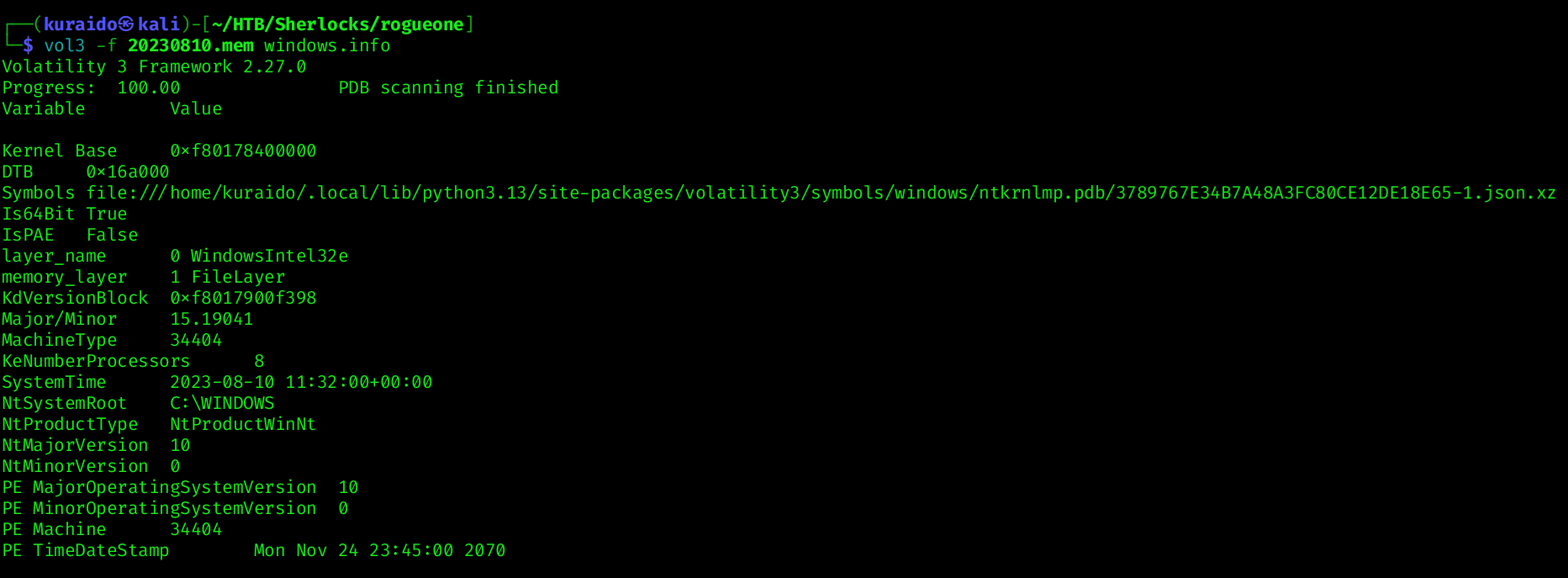
Since this investigation uses Volatility3, no manual profile selection is required, as Volatility3 automatically detects the appropriate kernel symbols.
Next, I enumerated running processes using:
1
vol3 -f 20230810.mem windows.pslist
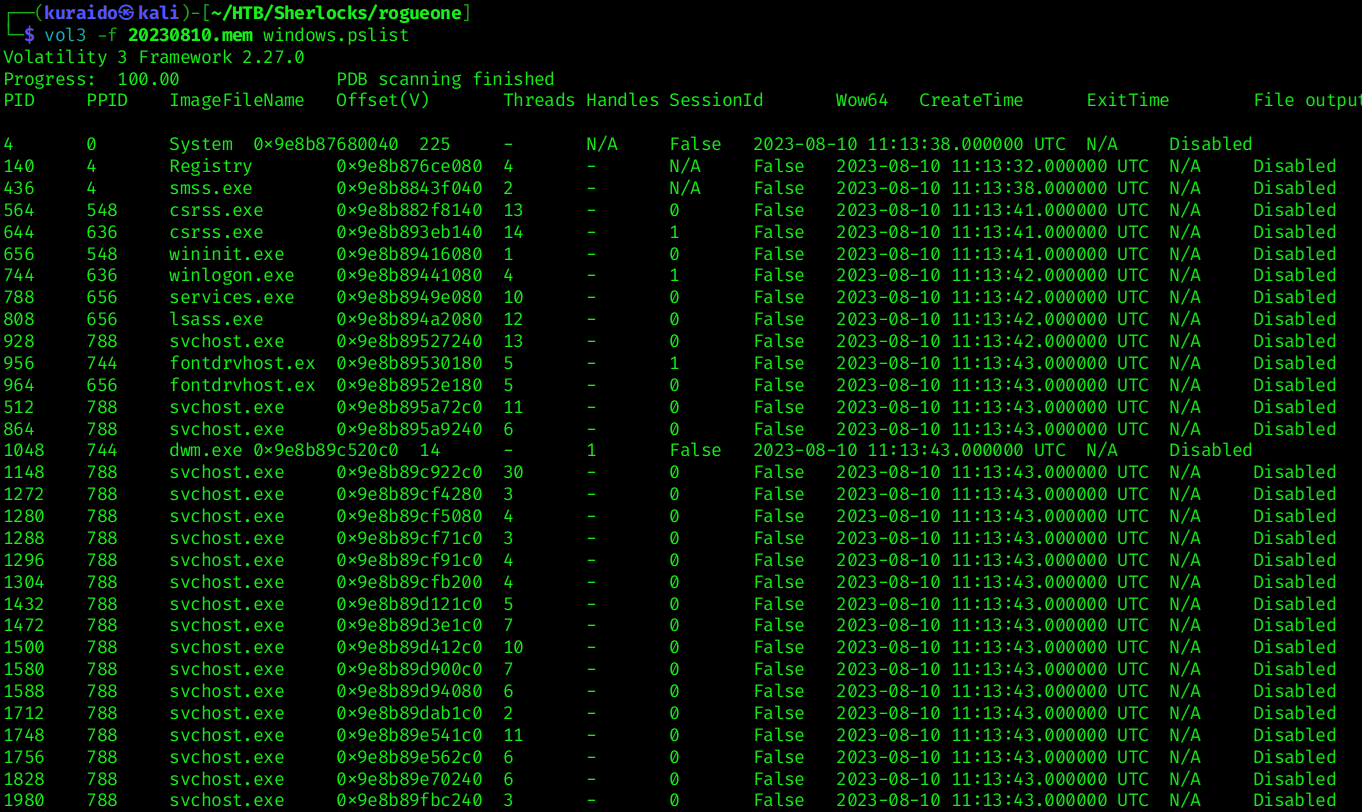
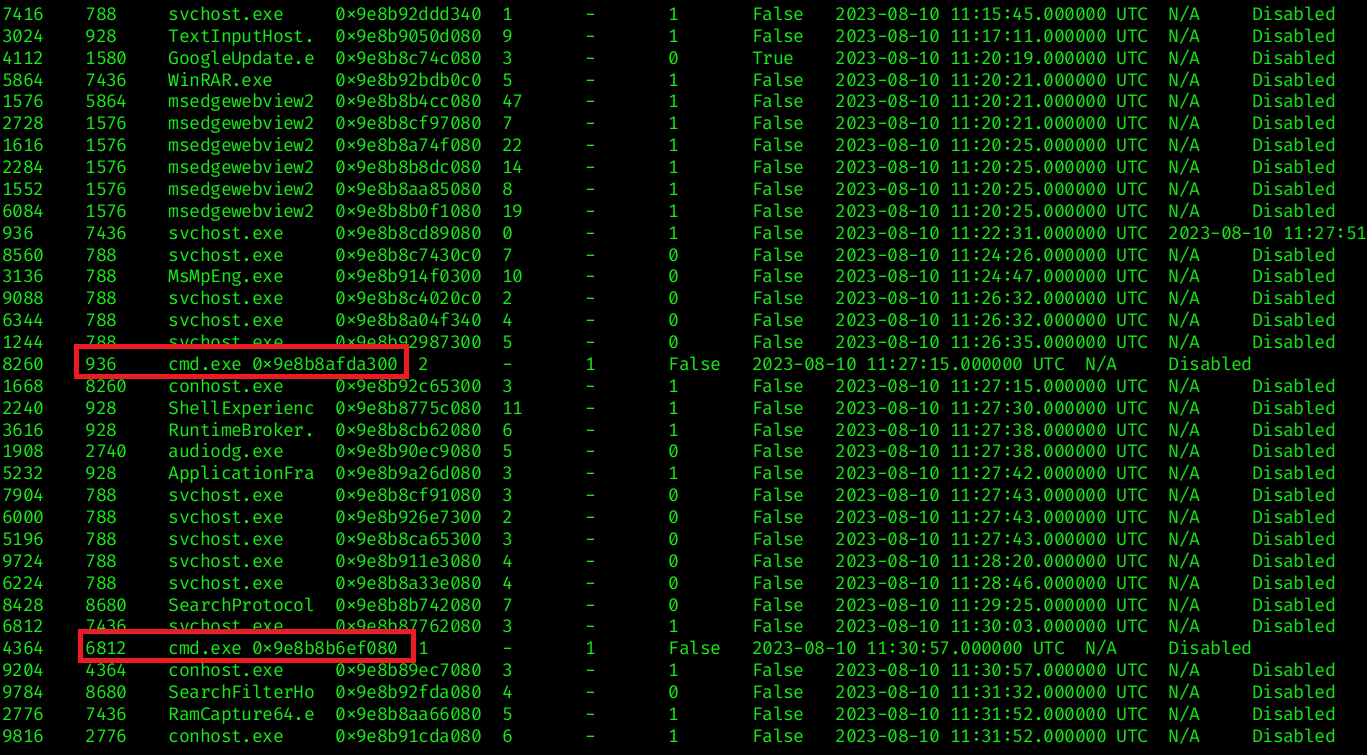 From the process list, two instances of
 svchost.exe stood out (PID 936 and PID 6812) because they spawned cmd.exe as a child process. While svchost.exe is a legitimate Windows process, it typically does not spawn command shells under normal circumstances.
To further validate this behavior, I examined the parent-child relationships using:
1
vol3 -f 20230810.mem windows.pstree
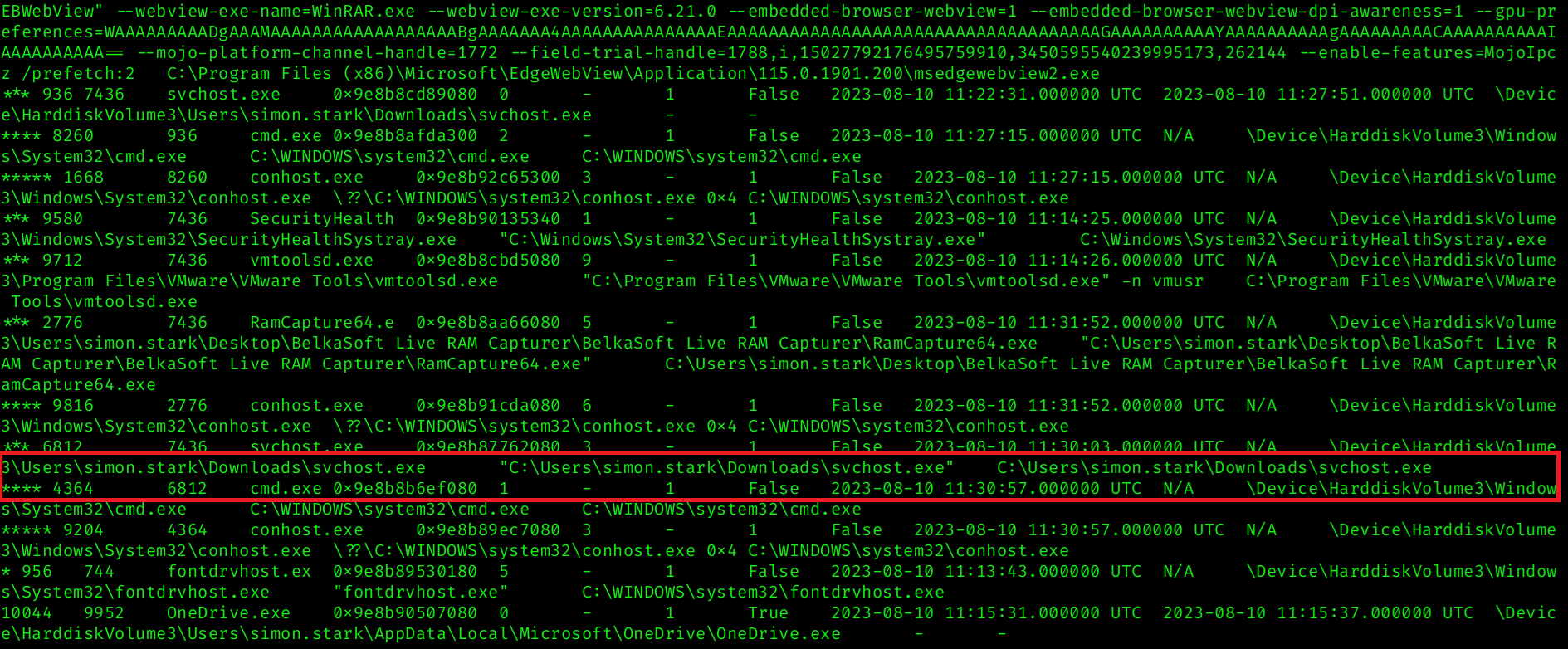 The process tree revealed that one of the
 svchost.exe processes was executing from a non-standard location:
C:\Users\simon.stark\Downloads\svchost.exe
This is highly suspicious, as legitimate svchost.exe binaries should reside in:
C:\Windows\System32\svchost.exe
The presence of svchost.exe in the Downloads directory strongly suggests that it is a malicious binary attempting to impersonate the legitimate Windows service host process.
This confirms that PID 6812 is the malicious process responsible for the suspicious activity, which answers the question.
Task 2
Question

The SOC team believe the malicious process may spawned another process which enabled threat actor to execute commands. What is the process ID of that child process?
Analysis
From Task 1, we identified the malicious process as:
svchost.exe(PID 6812)- Executing from
C:\Users\simon.stark\Downloads\svchost.exe
To determine whether this malicious process spawned any child processes, I examined its process tree using:
1
vol3 -f 20230810.mem windows.pstree --pid 6812
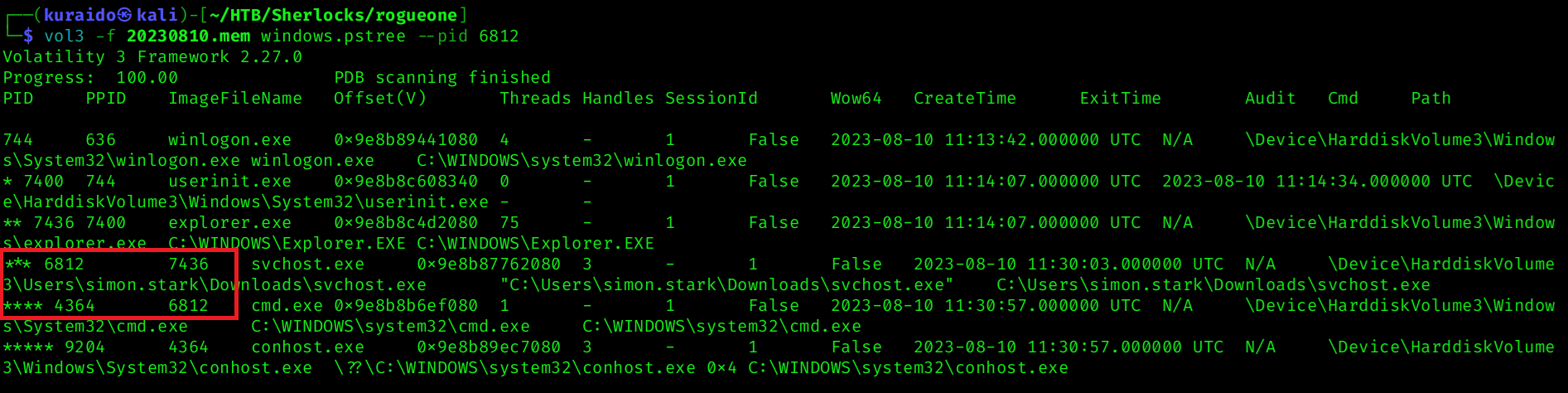 The output reveals that PID 6812 (
svchost.exe) spawned a child process:
cmd.exe(PID 4364)
The spawning of cmd.exe strongly suggests that the malicious process enabled command execution, allowing the threat actor to run commands on the compromised system.
Task 3
Question

The reverse engineering team need the malicious file sample to analyze. Your SOC manager instructed you to find the hash of the file and then forward the sample to reverse engineering team. Whats the md5 hash of the malicious file?
Analysis
From Task 1, we identified the malicious process as:
C:\Users\simon.stark\Downloads\svchost.exe
To obtain the file sample for hashing, I used the windows.filescan plugin to identify the virtual address of the malicious executable in memory. I then filtered the results for svchost.exe to locate the correct entry:
1
2
vol3 -f 20230810.mem windows.filescan > filescan.txt
cat filescan.txt | grep "svchost.exe"
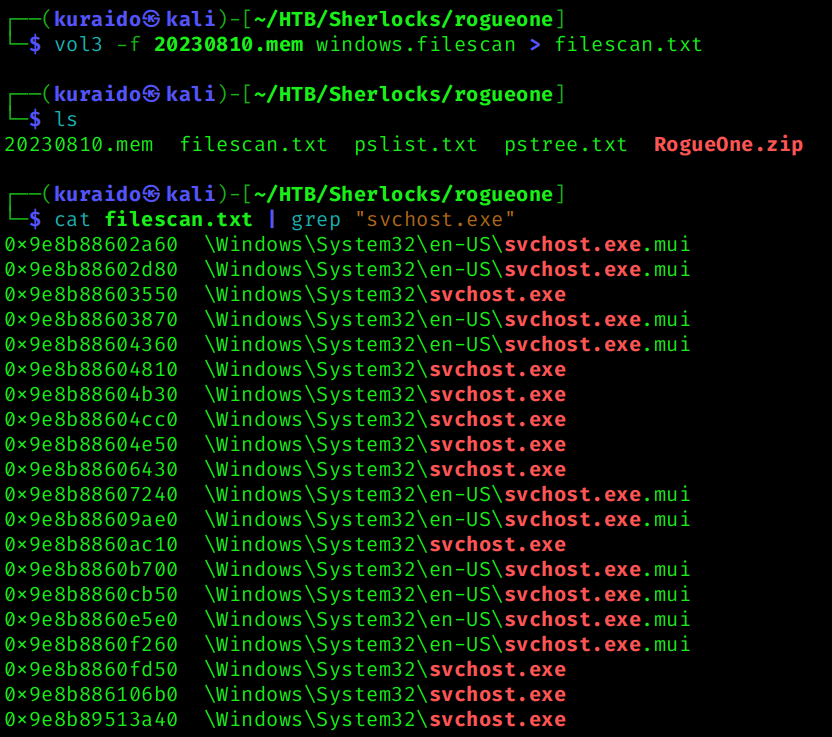
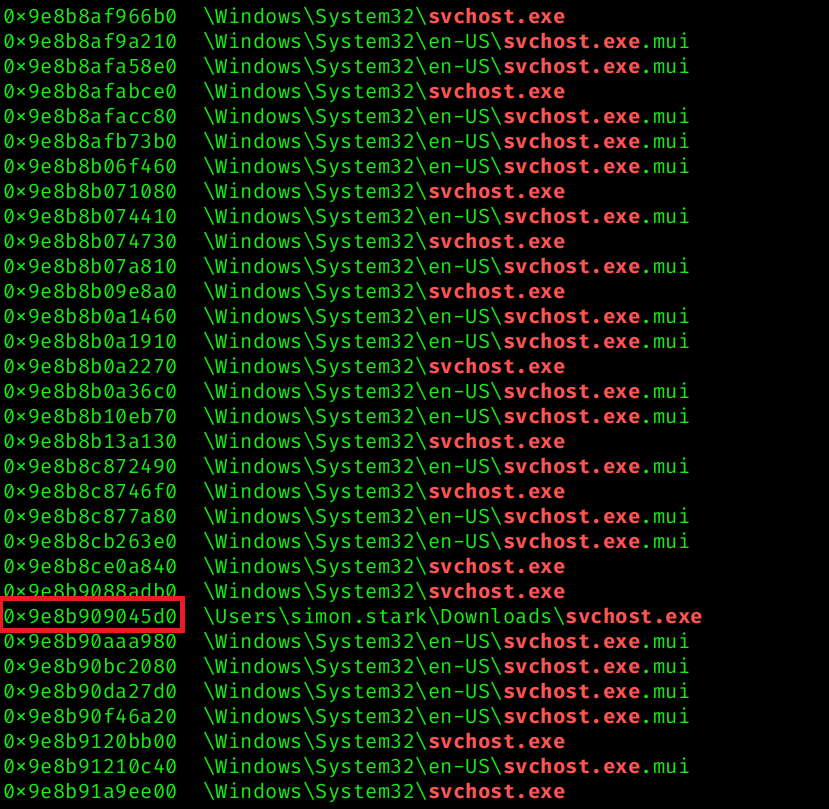 From the output, we identified the suspicious
 svchost.exe located in the Downloads directory with the following virtual address: 0x9e8b909045d0
Using the identified virtual address, I dumped the executable from memory:
1
vol3 -f 20230810.mem windows.dumpfiles --virtaddr 0x9e8b909045d0
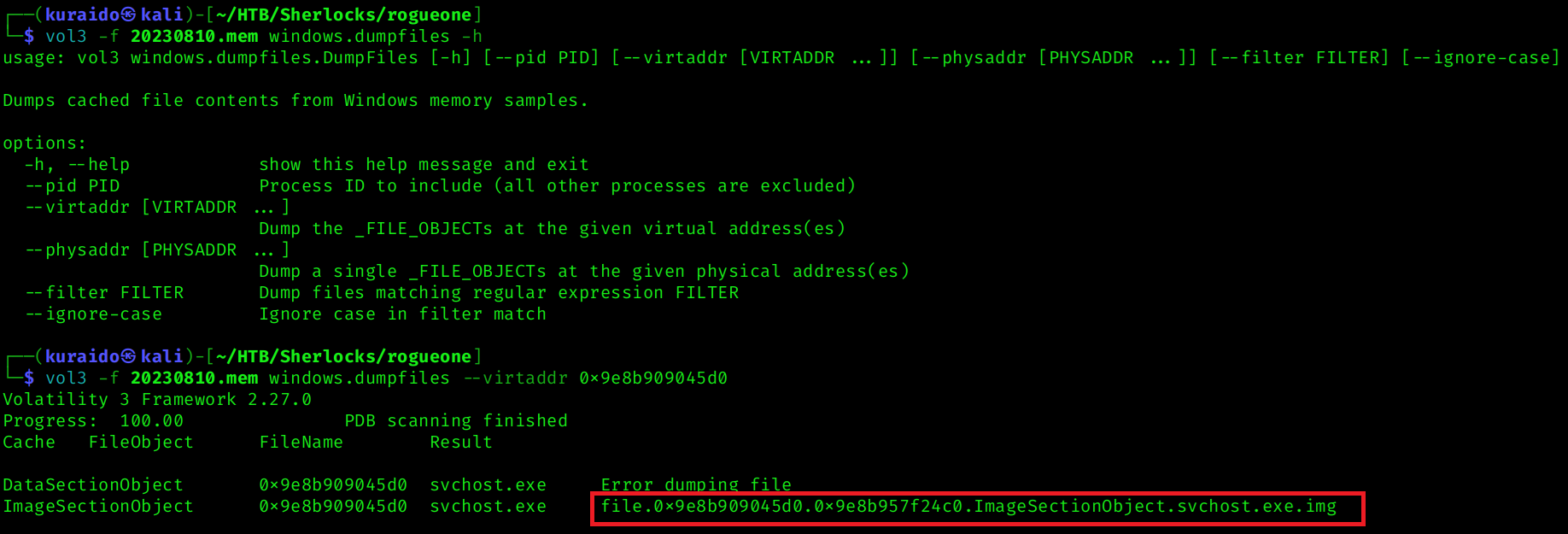 This produced the dumped image file:
 file.0x9e8b909045d0.0x9e8b957f24c0.ImageSectionObject.svchost.exe.img
To compute the MD5 hash of the dumped file:  The resulting MD5 hash of the dumped malicious executable is shown above, which answers the question.
Task 4
Question

In order to find the scope of the incident, the SOC manager has deployed a threat hunting team to sweep across the environment for any indicator of compromise. It would be a great help to the team if you are able to confirm the C2 IP address and ports so our team can utilise these in their sweep.
Analysis
To determine the Command and Control (C2) infrastructure used by the attacker, I analyzed active and historical network connections from the memory image using the windows.netscan plugin, which generates a list of all established, listening, and pending connections. Since we previously identified the malicious process as PID 6812, I then filtered the results to isolate network connections associated specifically with that process.
1
2
vol3 -f 20230810.mem windows.netscan > netscan1.txt
cat netscan.txt | grep 6812

Task 5
Question

We need a timeline to help us scope out the incident and help the wider DFIR team to perform root cause analysis. Can you confirm time the process was executed and C2 channel was established?
Analysis
The answer can be obtained from the previous task using the windows.netscan results.
From the established connection associated with PID 6812, we observed that the C2 channel was established at:  This confirms the time the malicious process was executing and communicating with the C2 server.
Task 6
Question

What is the memory offset of the malicious process?
Analysis
To determine the memory offset of the malicious process, I used the windows.pstree plugin and filtered for the previously identified malicious PID (6812): 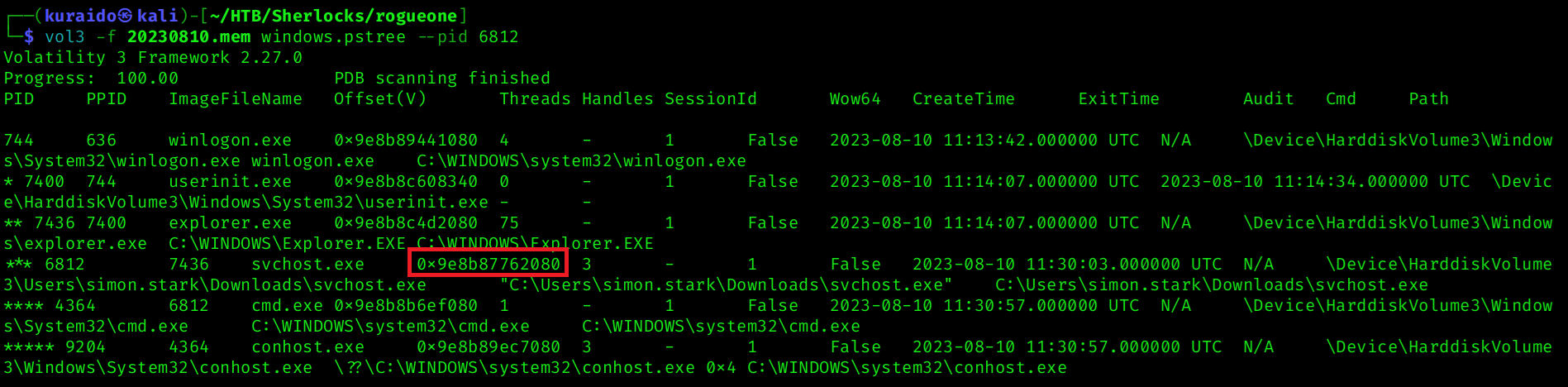 From the output, the memory offset of the malicious
 svchost.exe process can be identified in the Offset(V) column.
Task 7
Question

You successfully analyzed a memory dump and received praise from your manager. The following day, your manager requests an update on the malicious file. You check VirusTotal and find that the file has already been uploaded, likely by the reverse engineering team. Your task is to determine when the sample was first submitted to VirusTotal.
Analysis
Using the MD5 hash identified in Task 3, I searched for the sample on VirusTotal.
After searching the MD5 hash on VirusTotal, I navigated to the Details tab and reviewed the History section, where VirusTotal provides metadata including submission timestamps.
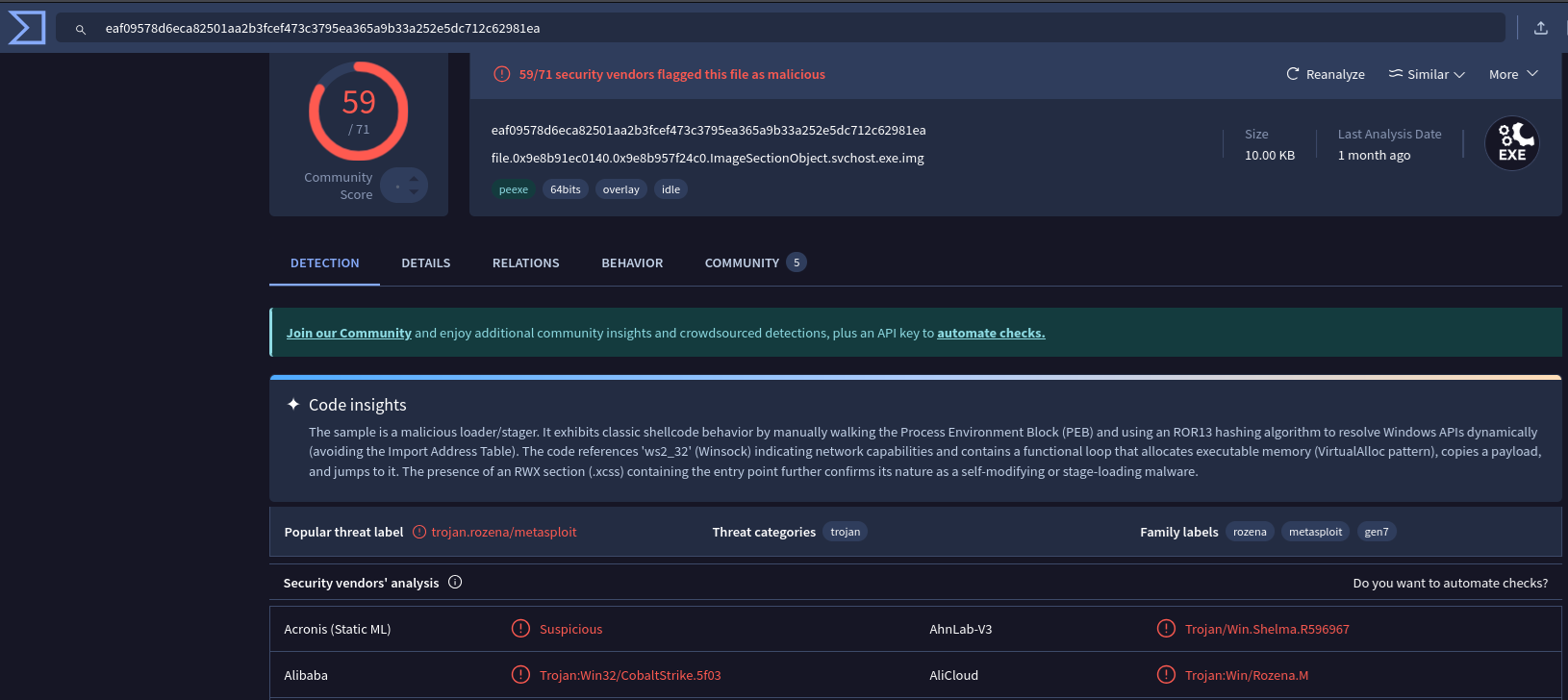
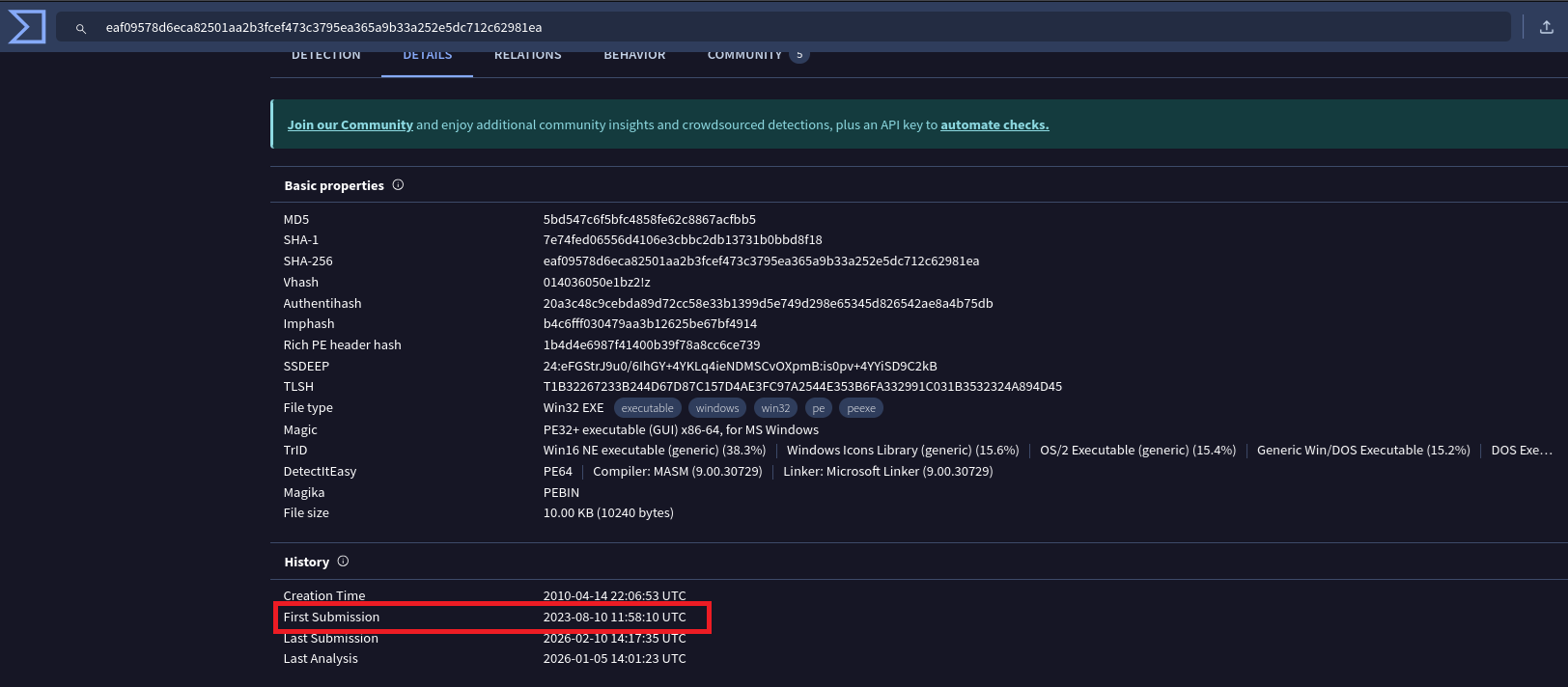 From the First Submission field, we can determine the date and time when the sample was first uploaded to VirusTotal.
Conclusion
Through memory forensics analysis using Volatility 3, we successfully identified a malicious svchost.exe process executing from a non-standard location within the user’s Downloads directory. The process spawned cmd.exe, enabling command execution, and established an outbound connection to an external C2 server.
By correlating process execution, network activity, and file artifacts directly from memory, we confirmed that the SIEM alerts were legitimate and indicative of active command-and-control communication.
This investigation highlights the effectiveness of memory forensics in uncovering attacker activity that may evade traditional endpoint monitoring tools, especially when malicious processes attempt to masquerade as legitimate system binaries.